
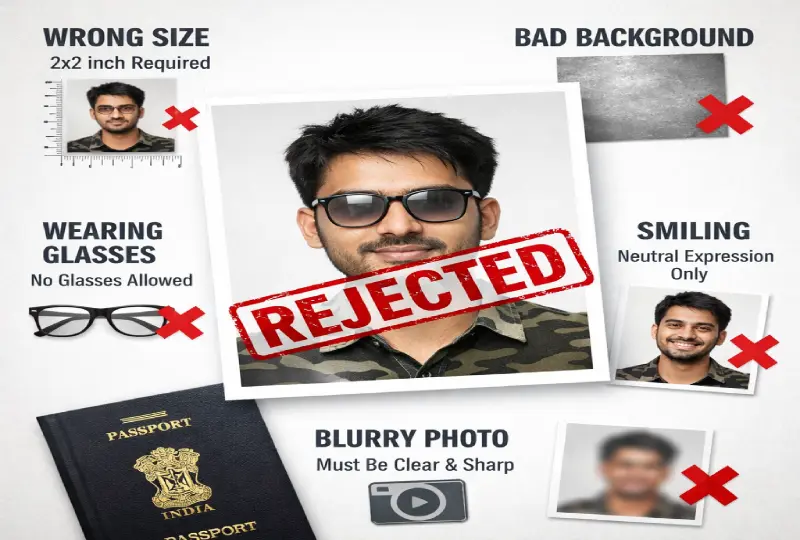
10 Reasons Your Passport Photo Gets Rejected in India (2026) – And How to Fix Each One
Passport photo rejection in India has become stricter in 2026. Under the upgraded Passport Seva Program (PSP 2.0), non-compliant photos are rejected immediately at the counter — there is no correction window or second chance on the same visit.
Since September 2025, Indian passport applications now require ICAO-compliant photos meeting updated digital specifications. If your photo was taken before September 2025, it may no longer meet the current standards even if it was accepted previously.
This guide covers every rejection reason, the exact rule behind it, and how to fix it before you submit.
1. Incorrect Photo Size or Resolution
This is the most common rejection reason and has become stricter in 2026. The Passport Seva Portal now enforces ICAO digital specifications:
-
Physical print size: 35×45 mm
-
Digital upload size: 630×810 pixels
-
Face coverage: 80–85% of the photo frame
-
Head height: 25–35 mm from chin to crown
-
Resolution: minimum 300 DPI
Note: The older 51×51 mm (2×2 inch) square format is no longer accepted for Indian passport applications. It is the US passport format. Indian passports require the 35×45 mm portrait format.
Fix: Use the Passport Photo Generator to automatically produce a 35×45 mm, 630×810 pixel, 300 DPI compliant photo from any phone image.
2. Non-White Background
The Indian passport photo must have a plain white background — no exceptions. Common mistakes that cause rejection:
-
Off-white, cream, or light grey background
-
Patterned walls, curtains, or textured surfaces
-
Digitally blurred or replaced backgrounds
-
Shadows creating a grey tint on the white background
-
Objects, furniture, or people visible behind the subject
Fix: Stand at least 1 metre away from a plain white wall to avoid shadow. If your background is not white, the Passport Photo Generator can remove and replace it automatically.
3. Shadows on Face or Background
Shadows are detected by the biometric verification system and trigger automatic rejection. They are caused by:
-
Overhead room lighting creating shadows under the chin or nose
-
Standing too close to the wall (shadow falls on background)
-
Uneven lighting — one side of the face brighter than the other
-
Flash creating harsh shadows behind the head
Fix: Shoot facing a large window in natural daylight. Position yourself at least 1 metre from the wall. Avoid direct sunlight which creates harsh shadows. Two light sources on either side of the face is ideal.
4. Smiling or Incorrect Facial Expression
Biometric facial recognition software maps fixed reference points on your face. A smile changes the geometry of the jawline, cheeks and eye area, which can cause the scan to fail or produce a poor biometric match. The rules are:
-
Neutral expression — no smile, no frown
-
Mouth must be closed
-
Both eyes fully open and clearly visible
-
Eyebrows in natural position — not raised or furrowed
Even a subtle "micro-smile" that shows teeth will be flagged by automated scanners in 2026.
Fix: Relax your face completely before the shot. Look directly into the camera lens, not at your own reflection on screen.
5. Wearing Glasses
Glasses have been banned in Indian passport photos since 2016 — with no exceptions for prescription eyewear. The reasons for rejection include:
-
Frames obscuring part of the face
-
Glare or reflection on lenses blocking eye visibility
-
Tinted or photochromic lenses darkening the eyes
This rule applies to all types — prescription glasses, reading glasses, and contact lenses with visible tinting.
Fix: Remove glasses before taking the photo. Eyes must be fully visible and unobstructed.
6. Blurry or Low-Resolution Image
The Passport Seva Portal's automated system checks image sharpness before human review. A blurry photo will be rejected at upload. Common causes:
-
Camera movement during the shot
-
Poor focus — subject not in the sharpest focal plane
-
Photo sent via WhatsApp or Telegram — both apps compress images heavily, often reducing a 3MB photo to under 100KB with visible quality loss
-
Screenshot of a photo instead of the original file
-
Over-compressed JPEG with visible artefacts
Fix: Always use the original file from your phone camera, not a shared or forwarded copy. Use the rear camera, not the front camera. If you need to reduce file size, use the Image Compressor which maintains sharpness while reducing file size.
7. Incorrect Head Position
The head must be perfectly centred and straight — the biometric system measures facial symmetry from reference points that only work correctly when the face is fully forward-facing.
-
Head must face directly forward — no turning left or right
-
No tilting — head must be level, not angled
-
Eyes must be at the horizontal midpoint of the photo
-
Full face visible from chin to hairline
-
Both ears should ideally be visible
Fix: Set your phone on a stable surface or tripod at eye level. Do not take a selfie — front cameras cause barrel distortion that alters facial geometry. Use the rear camera and ask someone else to take the photo.
8. Wearing Uniform or Camouflage
Uniforms, military clothing, and camouflage are not allowed in Indian passport photos. This includes:
-
Military, police, or paramilitary uniforms
-
Camouflage patterns of any colour
-
Clothing that blends with a white background (avoid all-white tops)
Fix: Wear plain, solid-coloured civilian clothing that contrasts with the white background. Light blue, navy, or grey shirts work well. Avoid pure white as it merges with the background.
9. Over-Edited or AI-Enhanced Photo
Under the 2025 ICAO update, zero digital editing is permitted on Indian passport photos. This is now a hard rule, not a guideline. Rejected editing includes:
-
Skin smoothing or blemish removal filters
-
AI face enhancement (common in phone camera apps)
-
Brightness or contrast adjustments
-
Beauty mode — disable this on your phone before shooting
-
Eye whitening or teeth brightening
-
Heavy colour correction or saturation changes
Edited photos fail biometric verification because they alter the facial geometry and skin tone data that recognition algorithms rely on.
Fix: Turn off beauty mode, AI enhancement, and portrait mode on your phone camera before taking the photo. Use standard photo mode only.
10. Old or Previously Used Photo
Indian passport rules require the photo to be taken within the last 6 months and must accurately reflect your current appearance. A photo is rejected if:
-
It is more than 6 months old
-
It was used in a previous passport or application
-
Your appearance has changed significantly — major weight change, different hairstyle, beard grown or shaved
Fix: Retake the photo. There is no workaround — the system cross-references biometric data from old applications and flags reused photos.
What to Do If Your Passport Photo Is Rejected
Under PSP 2.0, you will be informed of the rejection reason either at the counter or via your Passport Seva account status. Here is what to do:
-
Note the specific rejection reason provided
-
Do not resubmit the same photo with minor edits — it will be rejected again
-
Retake the photo from scratch following all guidelines above
-
Use the Passport Photo Generator to ensure correct size, background, and resolution before resubmitting
-
Book a new appointment if required at your Passport Seva Kendra
2026 Indian Passport Photo Requirements – Quick Checklist
-
✅ Size: 35×45 mm print / 630×810 pixels digital
-
✅ Face coverage: 80–85% of the frame
-
✅ Background: plain white only
-
✅ Expression: neutral, mouth closed, eyes open
-
✅ No glasses of any kind
-
✅ No shadows on face or background
-
✅ No editing, filters, or AI enhancement
-
✅ Taken within the last 6 months
-
✅ High resolution — minimum 300 DPI
-
✅ Rear camera used, not selfie camera
Frequently Asked Questions
What is the correct Indian passport photo size in 2026?
35×45 mm for print copies, and 630×810 pixels for digital upload to Passport Seva. Face must cover 80–85% of the frame. Resolution must be minimum 300 DPI. The old 51×51 mm square format is the US passport size — it is not accepted for Indian passports.
Can I use a photo taken at home for Indian passport?
Yes. A phone photo taken at home is acceptable provided it meets all ICAO requirements — plain white background, even lighting, no shadows, no editing, neutral expression, no glasses. Use the Passport Photo Generator to ensure compliance before uploading.
What happens if I submit a non-compliant photo under PSP 2.0?
Under the upgraded Passport Seva Program 2.0 (live from February 2026), non-compliant photos are rejected immediately with no correction window at the counter. You will need to book a new appointment and resubmit a compliant photo.
Are glasses allowed in Indian passport photos?
No. Glasses have been banned since 2016 with no exceptions — including prescription glasses, reading glasses, and tinted lenses. Eyes must be fully visible and unobstructed.
Can I reuse a passport photo from my previous application?
No. The system cross-references biometric data and flags reused photos. You must submit a new photo taken within the last 6 months that reflects your current appearance.
Final Advice
The 2026 ICAO update has made Indian passport photo compliance significantly stricter. A photo that was accepted two years ago may now be rejected by automated systems. The safest approach is to retake and recheck your photo against the current specifications before every application — even renewals.
Need a passport-size photo right now?
100% free · No sign-up · Instant download · Works on mobile
Create My Photo Free →