
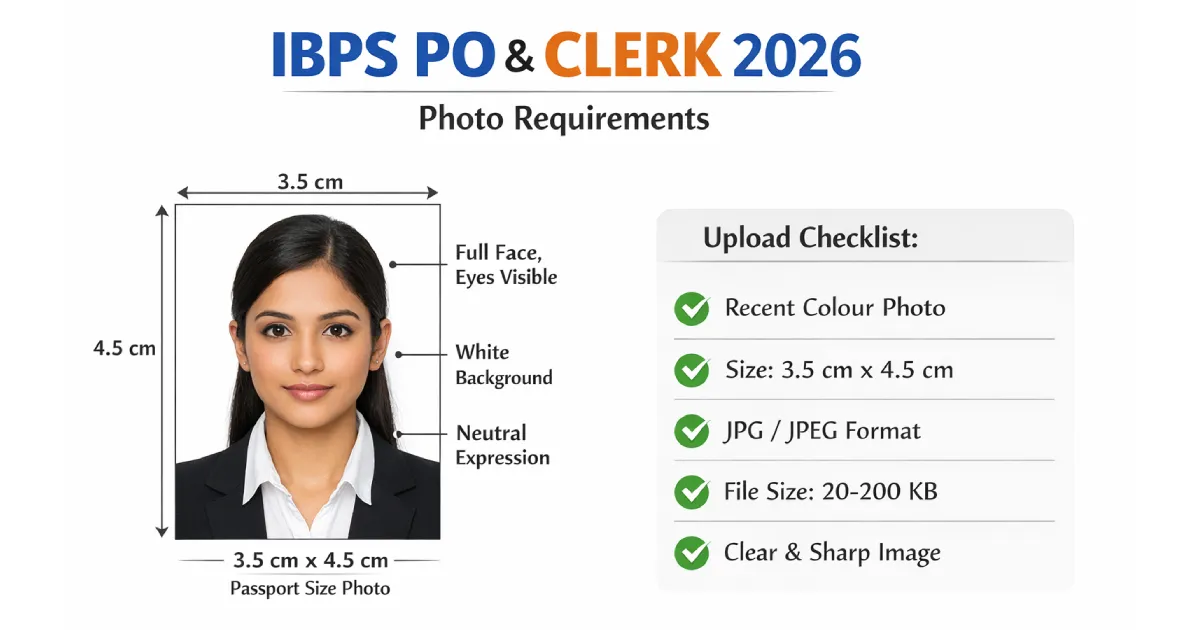
The IBPS portal validates every uploaded document automatically. An incorrect photo size, a file above 50 KB, or a selfie taken on your front camera will get your application blocked before any reviewer sees it. This guide covers every official photo, signature, thumb impression, and declaration requirement for IBPS PO 2026 (CRP PO/MT XVI) and IBPS Clerk 2026 (CRP Clerks XVI) — all verified from the official ibps.in notification.
⚠️ Key difference from UPSC: IBPS does not require your name or date printed on the photo. However, IBPS requires two additional uploads that UPSC does not — a left thumb impression and a handwritten declaration. Make sure you have all four documents ready before you start filling the form.
IBPS PO & Clerk 2026 Photo Requirements — Complete Specifications
These are the exact photo requirements from the official IBPS 2026 notification. Every field below is validated automatically by the ibps.in portal — one wrong value blocks your upload.
| Specification | Required Value | Status |
|---|---|---|
| Photo size (physical) | 3.5 cm × 4.5 cm | ⚠ Most common error |
| Dimensions (pixels) | 200 × 230 pixels | Mandatory |
| File format | JPG / JPEG only | Mandatory |
| File size | 20 KB – 50 KB | Strictly enforced — portal blocks outside this range |
| Background | Light-coloured, preferably plain white | Mandatory |
| Expression | Neutral, relaxed, looking straight at camera | Mandatory |
| Photo type | Colour only — no black & white | Mandatory |
| Selfies | Not accepted | Auto-rejected |
| Photo recency | Taken within 3 months | Strongly recommended |
ℹ️ IBPS PO vs IBPS Clerk: The photo specifications are identical for both IBPS PO (CRP PO/MT) and IBPS Clerk (CRP Clerks). If you are appearing for both exams in the same cycle, you can use the same photo for both applications.
All Four Documents You Need to Upload — Full Specifications
IBPS requires four scanned uploads, not just a photo. Missing or uploading an incorrect version of any one of them will prevent form submission. Here are the exact specifications for all four documents:
| Document | Dimensions | File Size | Format | Ink / Paper |
|---|---|---|---|---|
| Photograph | 200 × 230 px | 20 – 50 KB | JPG / JPEG | Colour photo |
| Signature | 140 × 60 px | 10 – 20 KB | JPG / JPEG | Black ink on white paper |
| Left thumb impression | 240 × 240 px | 20 – 50 KB | JPG / JPEG | Black or blue ink on white paper |
| Handwritten declaration | 800 × 400 px | 50 – 100 KB | JPG / JPEG | Black ink on white paper |
Signature — What IBPS Will Accept and Reject
The signature is the second most common upload failure after the photo itself. These rules apply equally to IBPS PO and IBPS Clerk:
- Sign in black ink on plain white paper — no ruled paper, no lines showing behind the signature
- Sign in your normal cursive style — a signature written entirely in capital letters is rejected outright
- The signature must be your own — no one else may sign on your behalf
- The same signature must be used everywhere: online form, call letter, attendance sheet, and all future stages of selection
- Scan at 200 DPI in colour mode, then crop tightly to the edges of the signature
- Final dimensions: 140 × 60 pixels, 10–20 KB, JPG
✅ Signature tip: Use a thick-tipped marker pen — not a ballpoint — on plain white A4 paper. Sign large, then crop tightly around just the signature before compressing. A bold, dark signature compresses to the 10–20 KB range much more cleanly than a thin ballpoint signature.
Left Thumb Impression — Step by Step
- Press your left thumb on plain white paper using black or blue ink only
- The impression must be clear and unsmudged — redo it if there is any smearing
- Photograph or scan it, then crop tightly to the thumbprint
- Final dimensions: 240 × 240 pixels, 20–50 KB, JPG
- If your left thumb is injured or unavailable, IBPS permits the right thumb — note this explicitly in your application form
Handwritten Declaration — Exact Text and Format
What to write (copy this exactly, in your own handwriting):
"I, __________ (Name of the candidate), hereby declare that all the information submitted by me in the application form is correct, true and valid. I will present the supporting documents as and when required."
- Write in your own handwriting on plain white paper with black ink
- Write in English only — Hindi or regional languages are not accepted
- Do NOT write in capital letters — this is an explicit rejection criterion in the IBPS notification
- Scan at 200 DPI and upload at 800 × 400 pixels, 50–100 KB, JPG
✅ Declaration tip: Write it on unruled white paper and photograph it in natural daylight — no shadows across the text. Use our free Image Resizer to set it to exactly 800 × 400 pixels, then our Image Compressor to bring it within 50–100 KB.
⚡ Prepare Your IBPS Photo Free — Resize to 200×230 px, Compress to 20–50 KB
Auto-crop, background removal, and correct file size — done in 60 seconds.
Generate IBPS Photo Free →IBPS Photo vs Other Banking & Government Exam Photos — Key Differences
If you are applying for multiple exams this year, use this comparison table to avoid uploading the wrong photo size to the wrong portal:
| Exam | Photo Size | File Size | Name + Date on Photo? | Signature Size |
|---|---|---|---|---|
| IBPS PO / Clerk | 3.5 × 4.5 cm | 20 – 50 KB | Not required | 140 × 60 px |
| UPSC CSE / IFoS | 4 × 5 cm | 20 – 300 KB | Yes — mandatory | 350–500 px sq. |
| SSC CGL / CHSL | 3.5 × 4.5 cm | 20 – 50 KB | Not required | 236 × 79 px |
| SBI PO / Clerk | 3.5 × 4.5 cm | 20 – 50 KB | Not required | 140 × 60 px |
| Railway RRB | 3.5 × 4.5 cm | 15 – 100 KB | Not required | Varies by RRB |
| NEET UG (NTA) | 3.5 × 4.5 cm | 10 – 200 KB | Name only | Varies |
ℹ️ IBPS and SBI share the same photo specs: SBI PO and SBI Clerk use the same 3.5 × 4.5 cm, 200 × 230 px, 20–50 KB, JPG format as IBPS. If you are applying to both banks, you can use the same photo file. UPSC is the one exception — it uses a completely different size (4 × 5 cm), different pixel dimensions, and requires your name and date printed at the bottom of the photo.
Common Reasons IBPS Photos Get Rejected
These are the exact reasons the IBPS portal blocks photo and document uploads. Check every one before clicking Submit on your application:
- Photo file size above 50 KB — the single most common rejection reason; always compress before uploading
- Photo in PNG, WebP, or any format other than JPG — IBPS only accepts JPG/JPEG; even renaming a PNG to .jpg is detected
- Dark, coloured, or patterned background — IBPS requires a light-coloured, preferably plain white background
- Selfie or front-camera photo — selfies are explicitly listed as not acceptable in the official notification
- Scanned photo from a printed copy — uploading a scan of a physical photograph is not permitted
- Signature in capital letters — a capital-letter signature is an explicit rejection criterion and will be cancelled at document verification
- Signature file above 20 KB — keep it between 10–20 KB using our free compressor
- Smudged or unclear thumb impression — redo it on fresh paper before scanning if there is any smearing
- Handwritten declaration in Hindi or a regional language — must be written in English only
- Declaration written in capital letters — this is a specific rejection criterion; use normal sentence case in your own handwriting
✅ Studio tip: If you are getting the photo taken at a studio, tell them: "I need a photo for IBPS PO or IBPS Clerk — 3.5 × 4.5 cm, plain white background, colour, relaxed expression, not a selfie." Most studios in metro cities are familiar with these specs. If you are in a smaller city or town, use our tool to be sure of every requirement.
How to Prepare Your IBPS Photo at Home — Step by Step
You can prepare a fully compliant IBPS photo in under 2 minutes using your phone. No studio visit required.
- Take the photo correctly first
Use your phone's rear camera, not the front selfie camera. Stand 2–3 feet from a plain white wall in a well-lit room. Natural light from a window directly in front of you works best — never light coming from behind you. Remove glasses. Look straight at the camera with a relaxed, neutral expression. Both ears should be clearly visible. - Upload to the free Exam Photo Generator
Go to our Government Exam Photo Generator, select IBPS PO or IBPS Clerk as the exam type, and upload your photo. The tool automatically crops to 3.5 × 4.5 cm and sets the pixel dimensions to 200 × 230 pixels. - Check the background
The tool automatically replaces any coloured or busy background with plain white. Confirm the face is centred, clearly visible, and free of shadows before proceeding. - Download and verify file size
The tool compresses the image to within 20–50 KB automatically. Download asphoto.jpg. No watermark, no payment, no sign-up required. - Prepare your signature separately
Sign in black ink on white paper, photograph or scan it clearly, crop tightly around the signature, then use our free Image Resizer to set dimensions to 140 × 60 pixels and our Image Compressor to bring it under 20 KB. - Prepare thumb impression and declaration the same way
Press your left thumb in black or blue ink on white paper, photograph clearly, and resize to 240 × 240 pixels at 20–50 KB. For the declaration, write the text in cursive black ink, photograph it, and resize to 800 × 400 pixels at 50–100 KB.
⚡ Generate IBPS Exam Photo Free — No Watermark, No Sign-Up
Resize to 200×230 px · White background · Compress to 20–50 KB · Download instantly
Generate IBPS Photo Free →Final Checklist Before You Submit Your IBPS Application
Go through every item below before clicking Submit on your IBPS PO or Clerk application form:
- ☑ Photo file is JPG format — not PNG, WebP, or PDF
- ☑ Photo file size is between 20 KB and 50 KB
- ☑ Photo dimensions are 200 × 230 pixels
- ☑ Background is light-coloured / plain white — no colour, no shadows
- ☑ Photo is a recent colour image — not a selfie, not black and white
- ☑ Photo was taken on a rear camera, not a front selfie camera
- ☑ Photo was taken within 3 months — and your appearance matches it
- ☑ Signature is in black ink, cursive style — NOT in capital letters
- ☑ Signature dimensions: 140 × 60 pixels, 10–20 KB, JPG
- ☑ Left thumb impression: 240 × 240 pixels, 20–50 KB, JPG — clear and unsmudged
- ☑ Handwritten declaration is written in English, in your own handwriting, in black ink, not in capitals
- ☑ Declaration text is correct: "I, _______, hereby declare that all the information submitted by me..."
- ☑ Declaration dimensions: 800 × 400 pixels, 50–100 KB, JPG
- ☑ All four files are JPG — not PNG, not PDF
Create your exam photo in under 60 seconds
Correct size · White background · Right file size · Free
Generate Exam Photo Free →For your signature and declaration files, use our free Image Resizer and Image Compressor.
You can also read our UPSC photo size guide or SSC CGL photo guide if you are also applying for those exams this year.