
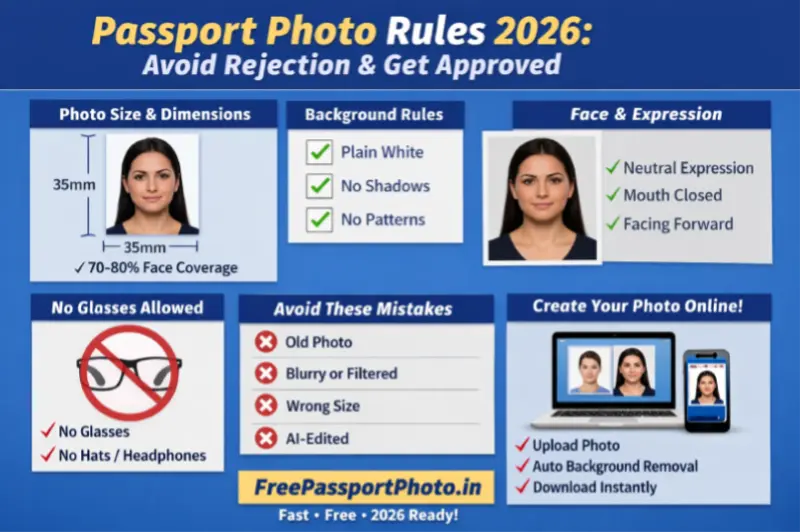
Passport Photo Rules 2026: Complete Guide to Size, Background, Face & Format
Getting your passport application rejected because of a wrong photo is one of the most common — and most avoidable — mistakes applicants make. In 2026, governments are using AI-based biometric verification that automatically flags non-compliant photos before a human even reviews your application.
This guide covers every current rule — exact sizes by country, background requirements, face positioning, what to avoid, and how to create a 100% compliant photo from your phone in under two minutes.
Passport Photo Size Requirements by Country (2026)
Photo size requirements vary significantly by country. Using the wrong format — even one that is close — will result in rejection. Here are the most common sizes:
| Country | Print Size | Digital Size | Face Coverage | Background |
|---|---|---|---|---|
| India | 51×51 mm (2×2 inch) | 350×350 px min, under 300KB | 70–80% | White or off-white |
| USA | 51×51 mm (2×2 inch) | 600×600 px at 300 DPI | 50–69% | White or off-white |
| UK | 35×45 mm | 413×531 px | 70–80% | Plain light grey or cream |
| Canada | 50×70 mm | 420×540 px min | 31–36 mm chin to crown | White |
| Australia | 35×45 mm | 600×750 px min | 32–36 mm chin to crown | White or off-white |
| Schengen / EU | 35×45 mm | 413×531 px | 70–80% | White or light grey |
Important for Indian applicants: The Indian passport uses a 2×2 inch square format — the same as the US passport. This is different from the 35×45 mm rectangular format used by the UK, EU, and Australia. Do not use a UK or European-style photo for an Indian passport application.
When you use the Passport Photo Generator and select your country, the correct dimensions are applied automatically.
Passport Photo Background Requirements (2026)
Background requirements are enforced by automated systems that scan pixel colour uniformity. The most common causes of background-related rejection are:
-
Wrong colour — India, USA, Canada and Australia all require white or off-white. The UK requires plain light grey or cream — a white background is not accepted for UK passports.
-
Shadows — a shadow falling on the background from the subject creates a grey patch that automated scanners flag immediately. Stand at least 1 metre from the wall.
-
Patterns or textures — textured walls, wallpaper, curtains, or furniture visible behind the subject will cause rejection.
-
Digitally blurred backgrounds — portrait mode or AI background blur is not allowed. The background must be genuinely plain, not edited.
-
Outdoor photos — sky, trees, buildings or any outdoor background are not accepted regardless of how plain they appear.
Fix: Stand in front of a plain white wall in natural daylight. If the background is not plain white, the Passport Photo Generator removes and replaces it automatically with a compliant background.
Face Position and Expression Rules
Biometric systems measure fixed reference points on the face — eye distance, chin-to-crown ratio, facial symmetry — to create a unique digital identity. Any deviation from the required position degrades the quality of this measurement and can cause automatic rejection.
Required
-
Face directly forward — no turning left or right
-
Head level — not tilted up, down, or sideways
-
Both eyes fully open and clearly visible
-
Neutral expression — relaxed, natural
-
Mouth closed
-
Both ears ideally visible
-
Full face visible from hairline to chin
Not Allowed
-
Smiling with teeth visible
-
Tilted or turned head
-
Hair covering eyes or part of face
-
Glasses of any kind (prescription, reading, tinted)
-
Raised or furrowed eyebrows
-
Eyes partially closed or squinting
Note on glasses: Most countries including India, USA, UK and Canada now prohibit glasses in passport photos with no exceptions. Remove glasses before taking the photo.
Dress Code and Accessories
Allowed
-
Casual or formal civilian clothing
-
Solid colours — dark clothing contrasts well against a white background
-
Religious head coverings — allowed in all countries provided the full face from hairline to chin is visible, with no shadows on the face
Not Allowed
-
Military, police or paramilitary uniforms
-
Camouflage clothing of any colour
-
Caps, hats or non-religious head coverings
-
Sunglasses or fashion accessories covering the face
-
Pure white tops — they can merge with the white background making the shoulder area invisible
Top Passport Photo Rejection Reasons in 2026
Based on Passport Seva rejection data and official guidelines, these are the most common rejection triggers in 2026:
-
Incorrect photo dimensions — wrong size format for the country, or wrong aspect ratio
-
File too large or wrong format — Indian Passport Seva portal requires JPEG under 300KB; many applicants upload files 10–20× too large
-
Shadows on face or background — the most common home photography mistake
-
Wrong head size ratio — face too small (too much background) or too large (chin or crown cut off)
-
Photo sent via WhatsApp — WhatsApp compresses images heavily, often reducing a 3MB photo to under 100KB with visible quality loss. Always use the original file.
-
Beauty mode or AI enhancement — most modern phone cameras have beauty mode enabled by default. Disable it before taking passport photos.
-
Photo older than 6 months — must reflect current appearance
-
Glasses — banned in most countries with no exceptions
-
AI-generated or heavily edited photos — flagged by biometric scanners
-
Reused photo from a previous application — system cross-references biometric data
How to Take a Compliant Passport Photo at Home
A home passport photo is accepted by all major countries including India, USA, UK and Canada — provided it meets official specifications. Here is a reliable method:
-
Location: Stand in front of a plain white wall. Position yourself at least 1 metre from the wall to prevent shadows on the background.
-
Lighting: Face a large window in natural daylight. Do not shoot with the window behind you — it creates silhouette. Avoid direct sunlight which creates harsh shadows. Overcast daylight through a window is ideal.
-
Camera: Use your phone's rear camera at eye level. Do not use the selfie camera — front cameras use a wide-angle lens that distorts facial proportions. Set the phone on a stable surface or tripod.
-
Settings: Turn off beauty mode, portrait mode, AI enhancement, and any filters before taking the shot. Use standard photo mode only.
-
Expression: Relax your face completely. Look directly at the camera lens — not at the screen. Keep your mouth closed and expression neutral.
-
File: Use the original file from your camera — not a forwarded or screenshot copy. Sharing via WhatsApp or Telegram compresses the image significantly.
-
Resize and format: Use the Passport Photo Generator to resize to the correct dimensions, replace the background if needed, and export at the correct DPI and file size for your country's portal.
Frequently Asked Questions
What is the correct passport photo size for India in 2026?
The official Indian passport photo size is 2×2 inches (51×51 mm) — a square format. For digital upload to the Passport Seva portal, the file must be JPEG format under 300KB, with face coverage of 70–80% and a plain white or off-white background. The 35×45 mm format is used by the UK and EU, not India.
Are glasses allowed in passport photos in 2026?
No. India, USA, UK and Canada all prohibit glasses in passport photos. This includes prescription glasses, reading glasses, and tinted lenses. There are no medical exceptions. Remove glasses before taking the photo.
Can I smile in a passport photo?
No. A neutral expression with mouth closed is required. Biometric facial recognition maps reference points that shift when you smile — a smile changes jawline, cheek and eye area geometry, which can cause the biometric scan to fail or produce a poor match.
How recent must a passport photo be?
The photo must be taken within the last 6 months and must reflect your current appearance. A photo from a previous application cannot be reused — the system cross-references biometric data and will flag it.
Can I take a passport photo with my phone?
Yes — provided you use the rear camera (not the selfie camera), turn off beauty and portrait modes, shoot in natural daylight against a plain white background, and use the original file without sharing it via WhatsApp. Use the Passport Photo Generator to resize and format the photo correctly before uploading.
What file size does the Indian Passport Seva portal accept?
JPEG format, between 10KB and 300KB. Most phone photos are 3–5MB and need to be compressed before upload. Use the Image Compressor to reduce file size without visible quality loss.
Create Your Compliant Passport Photo in Under 60 Seconds
The Passport Photo Generator handles size, background, DPI and face positioning automatically — select your country and the correct specifications are applied instantly. Completely free, no watermark, no signup required.
✅ Correct size for 50+ countries
✅ AI background removal
✅ 300 DPI biometric-ready output
✅ Mobile and desktop compatible
✅ No watermark, no registration
Need a passport-size photo right now?
100% free · No sign-up · Instant download · Works on mobile
Create My Photo Free →