
How to Take Passport Photos of Babies and Young Children (2026 Guide)
Taking a passport photo of a baby or young child can be surprisingly challenging. Unlike adults, babies don’t follow instructions, don’t sit still, and definitely won’t pose perfectly for the camera. Because of this, passport authorities around the world have slightly relaxed rules for infants — but you still need to follow specific guidelines to avoid rejection.
In this complete 2026 guide, you’ll learn exactly how to take a perfect baby passport photo at home, including background setup, lighting, size requirements, and common mistakes parents make.
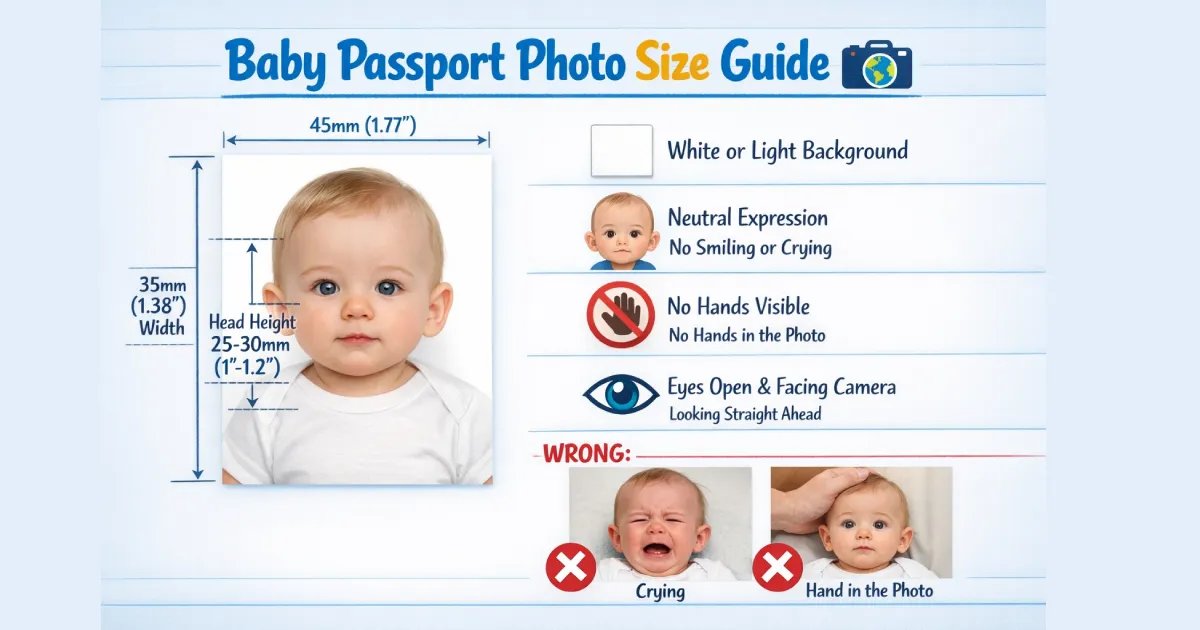
Why Baby Passport Photos Are Different
Passport photo rules for babies are slightly flexible because infants cannot maintain a fixed expression or posture. For example:
- Babies under 1 year can have their eyes partially closed
- Neutral expression is not strictly required
- Slight head tilt is acceptable (but should be minimal)
However, this does NOT mean anything goes. The photo must still clearly show the baby’s face, with proper lighting and a clean background.
Step-by-Step: How to Take Baby Passport Photo at Home
1. Choose a Plain White Background
The background must be plain white or light-colored with no patterns, textures, or shadows. The easiest way to achieve this is:
- Lay your baby on a white bedsheet or blanket
- Use a white wall as a background
- Ensure no wrinkles or shadows are visible
2. Use Natural Lighting
Lighting is one of the most important factors. Poor lighting is a common reason for rejection.
- Use natural daylight near a window
- Avoid harsh shadows on the face
- Do not use flash directly on the baby
3. Position the Baby Correctly
The baby should be positioned straight and facing the camera:
- Head centered in the frame
- Face clearly visible
- No side angles or tilted shots
Pro tip: Lay your baby flat on a white sheet and take the photo from above.
4. Keep the Face Clear
Make sure nothing is covering the baby’s face:
- No pacifiers
- No toys
- No hands visible (including parents)
5. Capture Multiple Shots
Babies move constantly, so take multiple photos and select the best one later. Look for:
- Clear focus
- No blur
- Proper framing
Passport Photo Size Requirements (India Standard)
For Indian passport applications, the standard size is:
- 35mm x 45mm (Width x Height)
- Head height should be 70–80% of the photo
- Digital size typically 600x600 pixels
If you are unsure about resizing, you can use our free tool:
👉 Create Passport Size Photo Online Free
What Should Babies Wear?
Clothing also matters for passport photos. Follow these tips:
- Dress the baby in simple, dark-colored clothes
- Avoid white clothes (it blends with background)
- No hats or head coverings (unless religious)
- No uniforms or fancy costumes
Common Mistakes to Avoid
Many passport applications get rejected due to small mistakes. Avoid these:
- Shadows on face or background
- Parent’s hands visible in photo
- Baby looking sideways
- Blurry or low-quality image
- Using filters or editing tools
Even a minor mistake can delay your application, so always double-check before uploading.
How to Edit and Resize Baby Passport Photo
After capturing the photo, you may need to crop and resize it according to official requirements. Instead of using complicated software, you can use simple online tools:
These tools help you adjust size, background, and file format instantly.
Pro Tips for Perfect Baby Passport Photo
- Take photos when the baby is calm or sleepy
- Use a white blanket for quick setup
- Keep camera at eye level
- Avoid distracting objects in background
- Always take multiple shots
Final Checklist Before Upload
- ✔ Plain white background
- ✔ No shadows
- ✔ Face clearly visible
- ✔ Correct size (35x45 mm)
- ✔ High-quality image
- ✔ No editing or filters
Conclusion
Taking a passport photo of a baby may seem difficult, but with the right setup and guidance, it becomes much easier. By following the steps in this guide, you can create a perfect passport photo at home without visiting a studio.
To save time and ensure accuracy, don’t forget to use our free online passport photo tool to resize and format your image instantly.