
Passport Photo Background Rules (All Countries 2026 Guide)
The background of your passport photo might seem like a small detail, but it is actually one of the most common reasons for rejection. Even if your face is perfectly visible, wearing the right clothes, and following size requirements, a wrong background can instantly disqualify your photo.
In this complete 2026 guide, you will learn everything about passport photo background rules, including official requirements, real-life examples, mistakes to avoid, and how to create a perfect background at home.
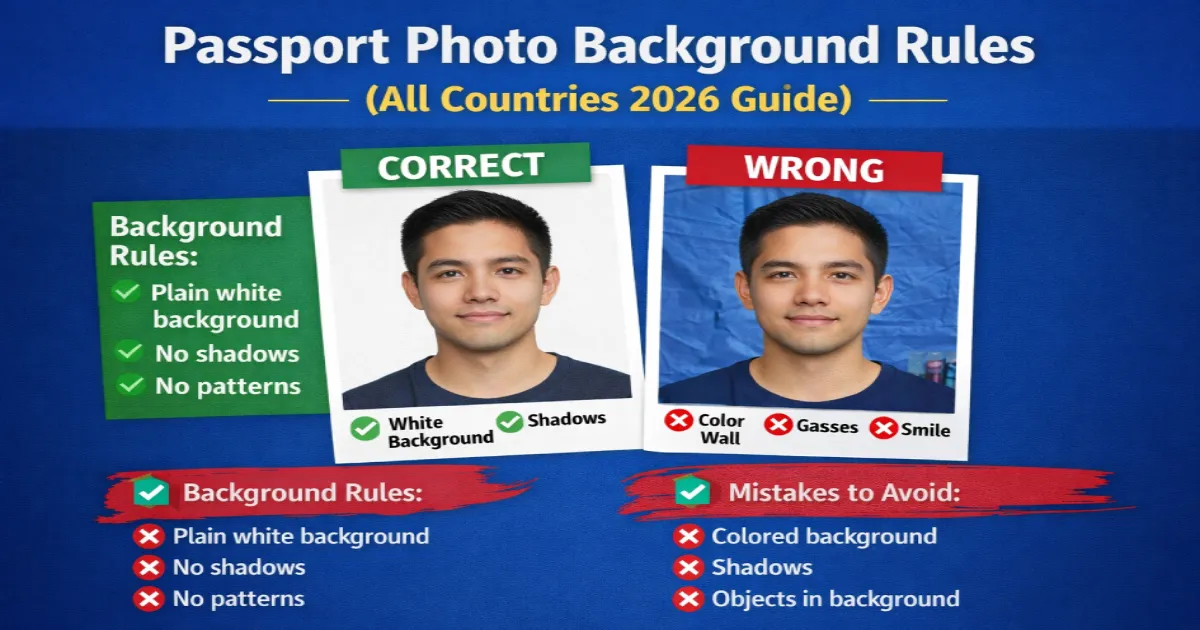
Why Passport Photo Background Matters
Passport authorities use strict image processing systems to verify identity. A clean background ensures that your facial features are clearly visible without distractions. This is why almost every country follows international ICAO (International Civil Aviation Organization) standards.
If your background is incorrect, your application may be delayed or rejected, forcing you to retake and resubmit your photo.
Official Passport Photo Background Requirements
Although minor variations exist between countries, most passport authorities follow these universal rules:
- Background must be plain white or light-colored
- No patterns, textures, or objects
- No shadows behind the head
- No gradients or color variations
- Face must clearly contrast with background
These rules apply to countries like India, USA, UK, Canada, and most others.
White Background vs Light Background
Many people get confused between “white” and “light-colored” backgrounds.
White Background (Recommended)
- Pure white color
- Best for all countries
- Lowest rejection rate
Light Background (Allowed in Some Cases)
- Very light grey or off-white
- Must not create shadows
- May be rejected in strict countries
Pro Tip: Always use a pure white background to be safe.
Examples of Correct Background
- Plain white wall
- White bedsheet (without wrinkles)
- White photo studio backdrop
Examples of Wrong Background
- Colored walls (blue, green, yellow)
- Textured walls or wallpapers
- Outdoor backgrounds
- Shadows behind head
- Objects or furniture visible
How to Create Passport Photo Background at Home
You don’t need a professional studio. You can easily create a perfect background at home by following these steps:
Step 1: Choose the Right Spot
Find a clean white wall or hang a plain white sheet behind you.
Step 2: Maintain Distance
Stand at least 1–1.5 meters away from the background to avoid shadows.
Step 3: Use Proper Lighting
- Use natural daylight near a window
- Avoid strong direct light
- Ensure even lighting on face
Step 4: Position Camera Correctly
Keep the camera at eye level and ensure your face is centered.
How to Fix Background Online (Instant Method)
If your background is not perfect, don’t worry. You can easily fix it using our free online passport photo generator.
👉 Fix Background & Create Passport Photo Online
This tool will automatically:
- Remove background
- Add perfect white background
- Adjust size according to requirements
- Make your photo ready for upload
Choose Country-Specific Passport Photo Size
Different countries have slightly different passport photo requirements. To ensure accuracy, use our country-specific photo tool:
👉 Select Your Country & Create Photo
Lighting Tips to Avoid Shadows
Shadows are one of the biggest reasons for rejection.
- Stand facing a light source
- Avoid light from one side only
- Use two light sources if possible
- Do not stand too close to wall
Common Background Mistakes to Avoid
- Wrinkled bedsheet background
- Dark or colored background
- Uneven lighting
- Shadow behind head
- Incorrect background editing
Pro Tips for Perfect Passport Photo Background
- Always use pure white background
- Keep proper distance from wall
- Use natural lighting for best results
- Check shadows before clicking photo
- Take multiple shots for best selection
Final Checklist
- ✔ Plain white background
- ✔ No shadows
- ✔ No objects behind
- ✔ Even lighting
- ✔ High-quality image
Conclusion
The background of your passport photo plays a crucial role in approval. By following the correct guidelines and avoiding common mistakes, you can easily create a perfect passport photo at home.
To save time and ensure accuracy, use our free online passport photo generator to automatically fix background, size, and format.
Need a passport-size photo right now?
100% free · No sign-up · Instant download · Works on mobile
Create My Photo Free →