
Couple Passport Size Photo Maker – Crop & Align Two Faces Free
Upload two photos. Manually crop each face to exact 35×45 mm passport size. Adjust spacing, add border, and merge side by side. Perfect for marriage visa, honeymoon passport, or joint applications. No signup, no watermark, 100% free.
📸 How your photo will look after cropping
You control the crop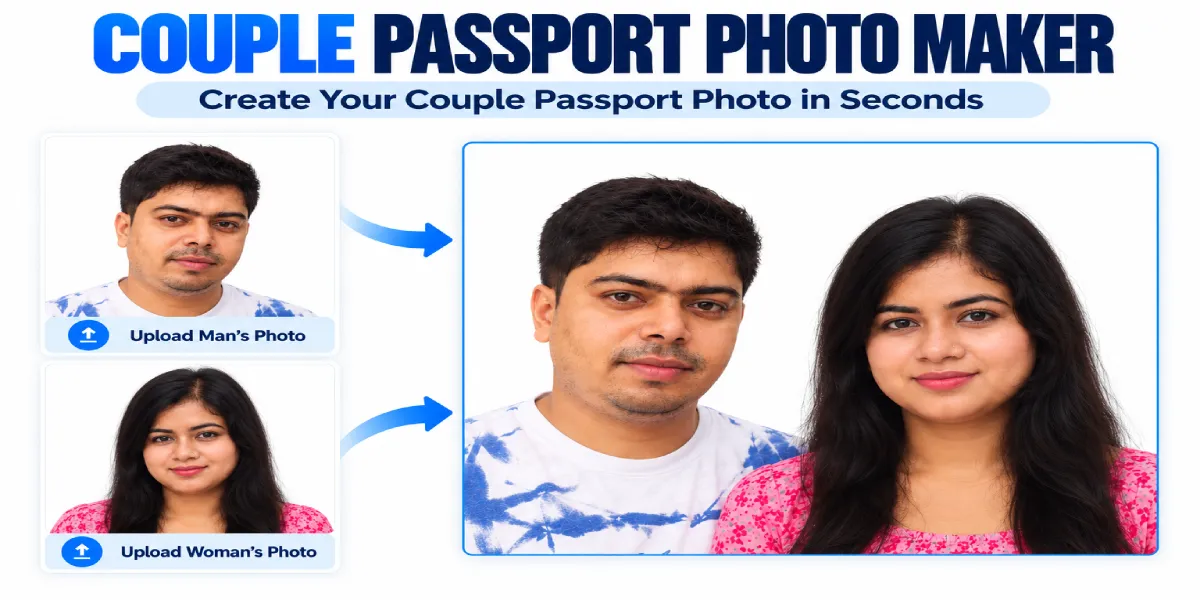
Person 1
Upload clear front-facing photo
Drop photo here or click to upload
JPG, PNG up to 10MB
Person 2
Upload clear front-facing photo
Drop photo here or click to upload
JPG, PNG up to 10MB
🎨 Customize Your Couple Photo
Person 1
Person 2
Couple Photo
Download Your Free Couple Photo
✓ No watermark ✓ 35×45 mm each face ✓ White background ✓ Instant download
Your photo is processed in your browser. No upload to servers. 100% private.
☕ This tool is free — and always will be
If it just saved you two a trip to a photo studio, you can buy me a coffee. No pressure — it just helps keep the site running.
Buy me a coffeeOpens your UPI app (GPay, PhonePe, Paytm) · Pick any amount · Completely optional
🔒 Secure payment via Razorpay · Includes high-res JPG + cutting-guide PDF
Pro Tips for Best Couple Passport Photo
- 📸 Use well-lit photos — Natural daylight works best. Avoid shadows on the face.
- ⬜ White background recommended — Photo with White background is recommended during cropping.
- 😊 Neutral expression — Both persons should have eyes open, mouth closed.
- 👓 No glasses or headgear — Unless required for medical or religious reasons.
- 📏 Face coverage — Face should cover 70-80% of the crop area.
📏 Passport Photo Size Guide for Couple Photos
Indian Passport
Total: 70×45 mm
USA Visa
Total: 4×2 inches
UK Visa
Total: 70×45 mm
Schengen Visa
Total: 70×45 mm
Frequently Asked Questions About Couple Passport Photos
Everything you need to know about creating couple passport size photos online
Yes! Our tool lets you upload two separate photos, manually crop each face to the standard 35×45 mm size (413×531 pixels at 300 DPI), and merge them side by side on a white background. 100% free, no signup required, no watermark. This tool is trusted by over 10,000+ users for marriage visa applications and joint passport photos.
Each individual photo is 35×45 mm (standard Indian passport size). When placed side by side, the total dimensions become 70×45 mm.
- Pixel dimensions: 413×531 px each (300 DPI)
- Total pixel dimensions: 826×531 px (with 0 spacing)
- File format: JPG
- Background: White (RGB 255,255,255)
This format is accepted for marriage visa applications in India, USA, UK, Canada, Australia, and Schengen countries.
Absolutely! Many marriage visa applications (USA, UK, Canada, Schengen) require a couple passport size photo with both partners. Our tool creates a compliant photo with:
- ✓ White background (RGB 255,255,255)
- ✓ 35×45 mm each face (standard passport size)
- ✓ 300 DPI print resolution
- ✓ Face covers 70-80% of photo
- ✓ Neutral expression, eyes open
Always check your specific embassy requirements, but our output meets standard international norms.
Yes! The tool is fully responsive and works perfectly on Android and iOS smartphones, tablets, laptops, and desktop devices. No app installation required — just visit the website on your mobile browser and upload photos from your gallery or take new ones directly with your camera. The crop tool works great on touch screens!
No. Absolutely not. All image processing happens entirely in your browser using JavaScript. Your photos are never sent to our server, stored, or shared. Once you close the browser or refresh the page, all images are permanently deleted from memory. Your privacy is 100% protected.
For best results:
- Download the JPG image from our tool
- Insert into a document editor (Word, Google Docs, Photoshop, or Canva)
- Set size to 70×45 mm (total couple photo size)
- Print at 100% scale — DO NOT use "Fit to Page" or any scaling
- Use high-quality photo paper (matte or glossy)
- Verify dimensions with a ruler after printing — it should measure exactly 70×45 mm
You can also take the digital file to any photo studio for professional printing.
Step-by-step cropping guide:
- After uploading each photo, click the "Crop to Passport Size" button below the preview
- A crop window will open with a fixed 35:45 aspect ratio (1:1.285)
- Drag the crop box to frame the face properly — the face should cover 70-80% of the box
- Use the resize handles to adjust the box size
- Click "Apply Crop" when satisfied
- The face will be centered and resized to exact 413×531 pixel passport dimensions
💡 Pro tip: For best results, ensure the eyes are positioned about halfway down the crop box.
For best results, we recommend using photos with a plain white background. Our tool adds a white background automatically during cropping, but starting with a white background photo ensures the cleanest final couple photo without any visible lines or color differences between the two faces.
If you don't have white background photos: You can use our free background removal tool before uploading to this couple photo maker.