
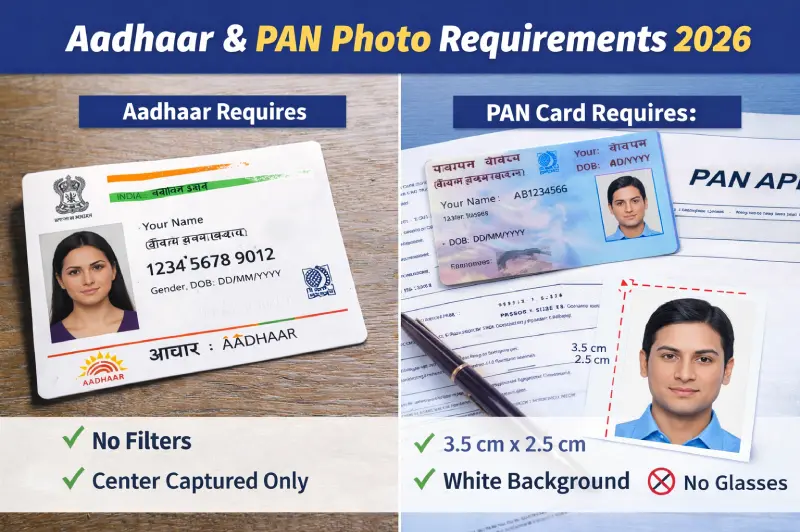
Aadhaar & PAN Card Photo Requirements 2026: Size, Format, File Size & Common Mistakes
Photo errors are one of the top reasons PAN card applications get rejected on the NSDL and UTIITSL portals in 2026. Wrong pixel dimensions, file too large, or wrong format — each is caught instantly by automated upload validators before a human even reviews your form.
This guide covers the exact specifications for both documents, what changed in 2026, and how to prepare a compliant photo from your phone without visiting a studio.
PAN Card Photo Requirements 2026 (NSDL & UTIITSL)
PAN card applications are processed through two authorized agencies — NSDL (now Protean eGov) and UTIITSL. Both follow Income Tax Department guidelines but have slightly different upload specifications. Use the table below for the exact requirements for your portal.
| Specification | NSDL (Protean) | UTIITSL |
|---|---|---|
| Physical size | 3.5 × 2.5 cm | 3.5 × 2.5 cm |
| Pixel dimensions | ~413 × 295 px | 213 × 213 px |
| Resolution | 200 DPI | 300 DPI |
| File format | JPEG / JPG | JPEG / JPG |
| Maximum file size | Under 50 KB | Under 30 KB |
| Background | White or light | White |
| Colour mode | Colour | Colour |
iPhone users note: iPhones save photos in HEIC format by default. Both PAN portals require JPEG. Convert to JPG before uploading — most conversion tools handle this in one step.
Which portal should you use? If your existing PAN card has the UTI logo on the back, use UTIITSL — they already hold your records and processing is typically faster. For new applications, NSDL is the more commonly used portal.
PAN Card Photo — Content Rules
-
Face must occupy most of the frame — both ears should be visible
-
Neutral expression, mouth closed
-
Both eyes fully open — no squinting
-
No glasses, sunglasses, or tinted lenses
-
No caps, hats, or headwear (except religious)
-
No shadows on face or background
-
No filters, beauty mode, or AI enhancement
-
Photo taken within the last 6 months
PAN Card Signature Requirements (same portal)
The signature upload on both portals follows separate specifications that trip up many applicants:
-
Sign on plain white paper using black or dark blue ink
-
Scan or photograph the signature clearly
-
JPEG format, under 50 KB (NSDL) or under 30 KB (UTIITSL)
-
Dimensions: approximately 2 × 4.5 cm
-
Do not use a digital signature or typed text
To resize your photo and signature to the exact NSDL or UTIITSL specifications, use the Image Resizer for dimensions and the Image Compressor to hit the KB target.
Aadhaar Photo Update in 2026 — What You Can and Cannot Do
This is the most searched question about Aadhaar in 2026, and the answer is clear: you cannot update your Aadhaar photo online.
UIDAI does not allow photograph updates through any online or self-service portal. Photo updates require a physical visit to an authorised Aadhaar Seva Kendra or Aadhaar Enrolment Centre — this restriction remains in effect as of March 2026. The photo is captured live on-site using the centre's camera. You do not need to bring a printed passport photo.
Aadhaar Photo Update Process (2026)
-
Locate your nearest Aadhaar Seva Kendra at uidai.gov.in or via the mAadhaar app
-
Download the Aadhaar Enrolment/Correction/Update Form and fill it in, marking the photo update option
-
Visit the centre with your existing Aadhaar card — no additional documents required
-
Biometric verification (fingerprint or iris scan) is done at the centre
-
Staff capture your new photo live using their equipment
-
Pay the fee — ₹125 following UIDAI's October 2025 revision
-
Collect your acknowledgement slip with the URN (Update Request Number)
-
Track status at uidai.gov.in using your URN
Processing time: Urban centres typically process updates within 30 days, while rural areas may take up to 90 days.
When Should You Update Your Aadhaar Photo?
UIDAI recommends updating your photo if:
-
Your current Aadhaar photo no longer resembles you due to significant changes in appearance
-
The existing photo is blurry or unclear, causing failures at bank KYC or airport verification
-
Your photo is more than 10 years old
-
Children enrolled before age 5 must update biometrics (including photo) when they reach age 5–7 — this update is free
-
Teens enrolled in childhood must update biometrics at age 15–17 — also free
What Can You Do Online for Aadhaar?
While photo updates require a centre visit, these changes can be made online via the UIDAI Self-Service Update Portal (SSUP):
-
Address update
-
Mobile number update
-
Email update
-
Name correction (with documents)
-
Date of birth correction (with documents)
Aadhaar vs PAN — Key Differences at a Glance
| Feature | Aadhaar | PAN Card |
|---|---|---|
| Photo uploaded online | ❌ Not allowed | ✅ Required for online application |
| Photo taken by | Centre operator (live capture) | You (upload yourself) |
| Print size | Captured at centre | 3.5 × 2.5 cm |
| Digital pixel size | N/A (not uploaded) | 213×213 px (UTIITSL) / 413×295 px (NSDL) |
| Max file size | N/A | 30–50 KB |
| Background | White/light (centre-controlled) | White |
| Update fee | ₹125 (biometric update) | ₹106 approx. (correction) |
| Processing time | 30–90 days | 15–30 days |
How to Take a Compliant Photo at Home for PAN Card
Since PAN card photos are uploaded by you, here is a reliable method to get a compliant photo from your phone:
-
Background: Stand in front of a plain white wall. Position yourself at least 1 metre away to prevent shadows on the background or if you don't have any photo with white background then you can use our free Image Background Remover.
-
Lighting: Face a window in natural daylight. Avoid shooting with the window behind you (creates silhouette) or in direct sunlight (harsh shadows).
-
Camera: Use the rear camera — front cameras use a wide-angle lens that distorts facial proportions. Place the phone on a stable surface at eye level.
-
Settings: Turn off beauty mode, portrait mode, and AI enhancement before shooting. Use standard photo mode only.
-
File: Use the original file from your camera. Never share via WhatsApp — it compresses photos heavily and will produce a file that fails biometric checks.
-
Resize: Use the Image Resizer to get exactly 213×213 px (UTIITSL) or 413×295 px (NSDL).
-
Compress: Use the Image Compressor to bring the file under 30 KB (UTIITSL) or 50 KB (NSDL).
Common Mistakes That Cause PAN Photo Rejection
-
File too large — the most common error. A phone photo is typically 3–5 MB. The portal requires under 50 KB (NSDL) or under 30 KB (UTIITSL). Always compress before uploading.
-
Wrong pixel dimensions — the upload validator checks dimensions server-side and rejects anything that doesn't match exactly.
-
HEIC format (iPhone users) — iPhone photos are HEIC by default. Both portals only accept JPEG. Convert before uploading.
-
Blurry or dark photo — poor lighting or camera movement. Shoot in natural light using a stable support.
-
Beauty mode or AI filter applied — disable before shooting. Edited photos fail biometric verification.
-
Cropped head or face too small — face must occupy most of the frame. Both ears should be visible.
-
Glasses causing glare — glasses are not allowed. Remove before taking the photo.
-
Not ticking the photo update checkbox — when updating an existing PAN card, you must tick the "Photo Mismatch" or photo update checkbox explicitly on the form. If you skip this, your photo will not be updated even if you upload a new one.
Frequently Asked Questions
Can I update my Aadhaar photo online in 2026?
No. UIDAI mandates an in-person visit to an authorised Aadhaar Enrolment/Correction Centre for all photo updates. Online portals only support demographic changes such as address, mobile number, and name.
What is the PAN card photo size for NSDL in 2026?
For the NSDL portal, your photo should be JPEG format, under 50 KB, approximately 3.5×2.5 cm (413×295 pixels at 300 DPI), with a white or light background.
What is the PAN card photo size for UTIITSL in 2026?
UTIITSL requires 213×213 pixels at 300 DPI, under 30 KB, in JPEG format.
How much does an Aadhaar photo update cost in 2026?
The fee is ₹125 following UIDAI's October 2025 revision, up from the earlier ₹100 flat charge. Children under 5 and teens at age 15–17 updating mandatory biometrics are exempt from the fee.
Can I use the same photo for both PAN and Aadhaar?
For PAN — yes, if the photo meets PAN specifications (correct size, white background, recent, no glasses) and you can also create one yourself by using our free Pan Photo Generator. For Aadhaar — no, because the Aadhaar photo is always captured live at the Seva Kendra and cannot be submitted by you but still if you want to create one then you can use our free Aadhaar Photo Generator.
How do I compress a photo to under 50 KB for PAN card?
Open the Image Compressor, upload your photo, set quality to 60–70% and select JPG output. For UTIITSL's stricter 30 KB limit, reduce quality to 50–60%. Always resize to the correct pixel dimensions first using the Image Resizer before compressing.
How long does Aadhaar photo update take?
Urban centres typically process updates within 30 days, while rural areas may take up to 90 days. Track your request using the URN on the acknowledgement slip at uidai.gov.in.
Prepare Your PAN Card Photo in Two Steps
Use these two free tools to get your photo exactly right before uploading to NSDL or UTIITSL:
-
Step 1 — Resize: Image Resizer → set to 213×213 px (UTIITSL) or 413×295 px (NSDL)
-
Step 2 — Compress: Image Compressor → bring file under 30 KB or 50 KB depending on portal
Both tools are free, work on mobile and desktop, and produce clean JPEG output with no watermark.
Need a passport-size photo for Aadhaar and PAN right now?
100% free · No sign-up · Instant download · Works on mobile
Create My Aadhaar Photo Free →